
Follow these steps for course assignment: to yourself or others:
- Login to the GHG Protocol Learning Store.
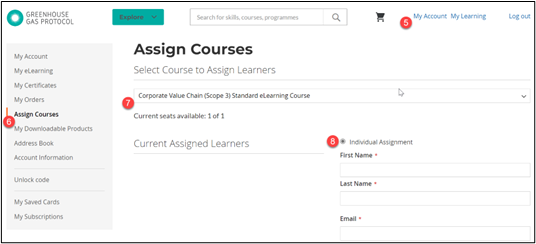
- Click My Account.
- Click Assign Course in the side panel.
- In the drop-down menu, select the course you wish to assign.
- Select Individual Assignment.
- Enter the name and email address of your learners (Note: you can assign a course to yourself by entering the email address associated with your account. Be sure to enter the correct one).
- Click Assign. Learners who do not have an account in our system will receive an email to complete their accounts.
- To access course materials, click My Learning in the top menu bar when login.
Comments
0 comments
Please sign in to leave a comment.